
22. 文件读取
1. 手动创建文件
在任意地点创建一个 .txt 文件,只要保证后续 .py 文件和该 .txt 文件在同一目录即可。

文件内容如下:
1,2,3,4,5,6,7,8,9,0
0,9,8,7,6,5,4,3,2,1

python,c++,c,java,c#,html,css,javascript,php
社会,公正,民主,法治,文明,友善,和谐
注意文件内容里的符号是中文/英文
2. 基础 open() 操作
open() 是默认读取模式,后面会系统讲解。
file = open('bornforthis.txt')注意:文件有打开就有关闭
file.close()
2.1 read()
用途:read() 可以直接读取打开的文件中的所有内容,如果需要指定字符数量,则用 read(size) 来指定。
file = open('bornforthis.txt')
content = file.read()              # read 可以读取整个文件
print(content)
输出:
1,2,3,4,5,6,7,8,9,0
0,9,8,7,6,5,4,3,2,1

python,c++,c,java,c#,html,css,javascript,php
绀句細锛屽叕姝o紝姘戜富锛屾硶娌伙紝鏂囨槑锛屽弸鍠勶紝鍜岃皭
更改:
file = open('bornforthis.txt', encoding='utf-8')
content = file.read()              # read 可以读取整个文件
print(content)

# -------output-------
1,2,3,4,5,6,7,8,9,0
0,9,8,7,6,5,4,3,2,1

python,c++,c,java,c#,html,css,javascript,php
社会,公正,民主,法治,文明,友善,和谐file = open('bornforthis.txt', encoding='utf-8')
content = file.read(10) # read 可以读取整个文件
print(content)
# -------output-------
1,2,3,4,5,size 将字母、数字、标点符号、换行、空格、汉字等都算进去,记为 1 个字符。
Windows 读取乱码/编码报错
读取乱码
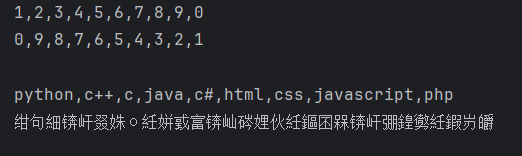
报编码错误,类似如下情况:
Traceback (most recent call last):
  File "/Users/huangjiabao/Books/code.py", line 2, in <module>
    file.read()
  File "<frozen codecs>", line 322, in decode
UnicodeDecodeError: 'utf-8' codec can't decode byte 0xce in position 0: invalid continuation byte
上述两个问题同时解决:
通过在 open 函数中添加 encoding='utf-8' ,即可实现成功运行。
file = open('bornforthis.txt', encoding='utf-8')
content = file.read()              # read 可以读取整个文件
print(content)
2.2 read() 优缺点
2.2.1 优点
- 语句简单易用
- 便于一次性读取和处理小文件
- 无需逐行处理,
read()可以全部读取 read()返回的是字符串,方便对字符串进行操作- 兼容性好
2.2.2 缺点
处理大型文件时内存消耗过大,且容易卡死,因为该方法将整个文件一次性读取到内存中。
无法对文件内容分批处理
无法逐行处理数据
不适合流式读取
文件结束符(EOF)处理问题:使用该方法读取文件后,文件指针在文件末尾,如果需要继续读取文件时,需要手动重置文件指针到开始或指定位置。否则再次调用读取的方法可能会返回空值或抛出异常。
file = open('bornforthis.txt', encoding='utf-8')
content = file.read()
print(f'第一次读取:{content}')


content = file.read()
print(f'第二次读取:{content}')
file.close()

# -------output-------
第一次读取:1,2,3,4,5,6,7,8,9,0
0,9,8,7,6,5,4,3,2,1

python,c++,c,java,c#,html,css,javascript,php
社会,公正,民主,法治,文明,友善,和谐

第二次读取:
解决方法1: 再次 open 文件
file = open('bornforthis.txt', encoding='utf-8')
content = file.read()
print(f'第一次读取:{content}')
file.close()

file = open('bornforthis.txt', encoding='utf-8')
content = file.read()
print(f'第二次读取:{content}')
file.close()

# -------output-------
第一次读取:1,2,3,4,5,6,7,8,9,0
0,9,8,7,6,5,4,3,2,1

python,c++,c,java,c#,html,css,javascript,php
社会,公正,民主,法治,文明,友善,和谐

第二次读取:1,2,3,4,5,6,7,8,9,0
0,9,8,7,6,5,4,3,2,1

python,c++,c,java,c#,html,css,javascript,php
社会,公正,民主,法治,文明,友善,和谐
解决方法2: 使用 seek 控制指针回到文件开头
file = open('bornforthis.txt', encoding='utf-8')
content = file.read()
print(f'第一次读取:{content}')

file.seek(0)

content = file.read()
print(f'第二次读取:{content}')
file.close()

# -------output-------
第一次读取:1,2,3,4,5,6,7,8,9,0
0,9,8,7,6,5,4,3,2,1

python,c++,c,java,c#,html,css,javascript,php
社会,公正,民主,法治,文明,友善,和谐

第二次读取:1,2,3,4,5,6,7,8,9,0
0,9,8,7,6,5,4,3,2,1

python,c++,c,java,c#,html,css,javascript,php
社会,公正,民主,法治,文明,友善,和谐
2.3 read() 的分块读取
2.3.1 手动分块读取
上文提到 read() 会一次性读取文件全部内容,导致内存占用过大或卡顿问题。
分块读取(chunked reading)是解决这一问题的常用方式。
file = open('bornforthis.txt', encoding='utf-8')
content = file.read(10)
print(f'第一次读取:{content}')

content = file.read(10)
print(f'第二次读取:{content}')
file.close()

# -------output-------
第一次读取:1,2,3,4,5,
第二次读取:6,7,8,9,0
2.3.2 任务:解决大文件读取问题
目标:使用函数+循环的方式实现 read 的分块读取;
需求:给你一个大文件,你要实现一个函数来分块读取文件所有内容。换句话说:实现的函数最后输出的内容是文件的全部内容,但是实际实现则是分块读取!
自动分块读取就是在手动读取的基础上添加循环,那么循环结束的标志如何确定。此处可以用 len(content) 小于 size 辅助确定。
file = open('bornforthis.txt', encoding='utf-8')

i = 1
is_finished = False
while not is_finished:
    content = file.read(10)
    print(f'第{i}次读取:{content}')
    i += 1

    if len(content) < 10:
        is_finished = True

file.close()

# -------output-------
第1次读取:1,2,3,4,5,
第2次读取:6,7,8,9,0

第3次读取:0,9,8,7,6,
第4次读取:5,4,3,2,1

第5次读取:
python,c+
第6次读取:+,c,java,c
第7次读取:#,html,css
第8次读取:,javascrip
第9次读取:t,php
社会,公
第10次读取:正,民主,法治,文明
第11次读取:,友善,和谐
注意:空格/换行也算作 1 个字符,因此读取时需要注意格式
当在数字前增加 10 个空格时,第一次读取会将 10 个空格读取出来:
文件:
          1,2,3,4,5,6,7,8,9,0
0,9,8,7,6,5,4,3,2,1

python,c++,c,java,c#,html,css,javascript,php
社会,公正,民主,法治,文明,友善,和谐
读取结果:
第1次读取:
第2次读取:1,2,3,4,5,
第3次读取:6,7,8,9,0

第4次读取:0,9,8,7,6,
第5次读取:5,4,3,2,1

第6次读取:
python,c+
第7次读取:+,c,java,c
第8次读取:#,html,css
第9次读取:,javascrip
第10次读取:t,php
社会,公
第11次读取:正,民主,法治,文明
第12次读取:,友善,和谐
但是当我们再敲击回车换行时,pycharm 会自动默认原本第1行输入的 10 个空格不需要,第一行只保留 换行,将原本第一行的 10 个空格移到第二行的数字前,所以读取时,会先读取换行,再读取空格 。
文件内容:
          1,2,3,4,5,6,7,8,9,0
0,9,8,7,6,5,4,3,2,1

python,c++,c,java,c#,html,css,javascript,php
社会,公正,民主,法治,文明,友善,和谐
读取结果:
第1次读取:

第2次读取: 1,2,3,4,5
第3次读取:,6,7,8,9,0
第4次读取:
0,9,8,7,6
第5次读取:,5,4,3,2,1
第6次读取:

python,c
第7次读取:++,c,java,
第8次读取:c#,html,cs
第9次读取:s,javascri
第10次读取:pt,php
社会,
第11次读取:公正,民主,法治,文
第12次读取:明,友善,和谐首先思考,当内容都读取完成后,读取出来的内容是什么?
file = open('bornforthis.txt', encoding='utf-8')

content = file.read(10)
print(f'第 ? 次读取:{content}')
content = file.read(10)
print(f'第 ? 次读取:{content}')
content = file.read(10)
print(f'第 ? 次读取:{content}')
content = file.read(10)
print(f'第 ? 次读取:{content}')
content = file.read(10)
print(f'第 ? 次读取:{content}')
content = file.read(10)
print(f'第 ? 次读取:{content}')
content = file.read(10)
print(f'第 ? 次读取:{content}')
content = file.read(10)
print(f'第 ? 次读取:{content}')
content = file.read(10)
print(f'第 ? 次读取:{content}')
content = file.read(10)
print(f'第 ? 次读取:{content}')
content = file.read(10)
print(f'第 ? 次读取:{content}')
content = file.read(10)
print(f'第 ? 次读取:{content}')
content = file.read(10)
print(f'第 ? 次读取:{content}')
content = file.read(10)
print(f'第 ? 次读取:{content}')
print(f'无内容时读取的是:类型→{type(content)}, 是否有内容→{bool(content)}')

file.close()

# -------output-------
第 ? 次读取:1,2,3,4,5,
第 ? 次读取:6,7,8,9,0

第 ? 次读取:0,9,8,7,6,
第 ? 次读取:5,4,3,2,1

第 ? 次读取:
python,c+
第 ? 次读取:+,c,java,c
第 ? 次读取:#,html,css
第 ? 次读取:,javascrip
第 ? 次读取:t,php
社会,公
第 ? 次读取:正,民主,法治,文明
第 ? 次读取:,友善,和谐

第 ? 次读取:
第 ? 次读取:
第 ? 次读取:
无内容时读取的是:类型→<class 'str'>, 是否有内容→False
探究可知,没有内容可读取时,输出的是空字符串,且没有报错。
可以根据判断输出的内容是否为空字符串来界定边界。
file = open('bornforthis.txt', encoding='utf-8')

content = ' '
while content:
    content = file.read(10)
    print(f'第xx次读取:{content}')

file.close()

# -------output-------
第xx次读取:1,2,3,4,5,
第xx次读取:6,7,8,9,0

第xx次读取:0,9,8,7,6,
第xx次读取:5,4,3,2,1

第xx次读取:
python,c+
第xx次读取:+,c,java,c
第xx次读取:#,html,css
第xx次读取:,javascrip
第xx次读取:t,php
社会,公
第xx次读取:正,民主,法治,文明
第xx次读取:,友善,和谐

第xx次读取:                   # 此处多输出的一行,考虑如何调整 print 的位置使这一行不输出的情况下结束循环
保留 txt 文件的源格式:
file = open('bornforthis.txt', encoding='utf-8')

content = ' '
while content:
    content = file.read(10)
    print(content, end='')

file.close()

# -------output-------
1,2,3,4,5,6,7,8,9,0
0,9,8,7,6,5,4,3,2,1

python,c++,c,java,c#,html,css,javascript,php
社会,公正,民主,法治,文明,友善,和谐
优化:
content之后都会被覆盖,那么 line 3 里不需要将其设为空字符串,直接用布尔值content = True即可,逻辑上也便于跟while连接。
Q&A
上面探究环节主要的思考点在于:循环到何时停止,那么免不了思考文件到底有多长?知道长度就能让读取停止。
Q1: 为什么 Python 不提供直接访问文件长度的方法?
A1:获取文件长度的本质 “可能” 就是读取整个文件后获得长度,那么访问文件长度与读取文件的时长和复杂程度是相近的,因此没有太大的区别。
Q2:我们现在研究的终极目标是什么?
A2:不是为了得到一个文件/内容的长度,而是通过小文件找到规律,从而反哺到大文件上。
即:大文件套用小文件的规律。
举个例子🌰:
操作大文件需要花费的时间较长,将大文件整块操作时,一旦遇到错误则前功尽弃。因此更好的办法是进行分块操作,后一步在前一步的基础上操作;或分块操作彼此独立,最后可以将操作结果整合。
核心思想: 问题拆解。
大问题:大文件如何分块读取?
拆解:小文件如何分块读取?(探路)→ 小文件手动分出 第一块 并读取 → 小文件手动分出 多块 并读取 → 观察 最后一块 的特点 → 判断出小文件读取结束后再输出的内容没有数据 → 将结论应用到自动循环中。
2.3.3 排除文件中“回车”渲染影响
当 print() 进行渲染的时候,原文中的换行会直接渲染,但是我们知道字符 \n 是表示换行的。那么如何在输出时保留字符 \n 而不进行换行渲染呢?
file = open('bornforthis.txt', encoding='utf-8')

content = True
while content:
    content = file.read(10)
    print(content.replace('\n', r"\n"), end='')

file.close()

# -------output-------
1,2,3,4,5,6,7,8,9,0\n0,9,8,7,6,5,4,3,2,1\n\npython,c++,c,java,c#,html,css,javascript,php\n社会,公正,民主,法治,文明,友善,和谐file = open('bornforthis.txt', encoding='utf-8')
content = True
while content:
content = file.read(10)
print(content.replace('\n', "\\n"), end='')
file.close()
# -------output-------
1,2,3,4,5,6,7,8,9,0\n0,9,8,7,6,5,4,3,2,1\n\npython,c++,c,java,c#,html,css,javascript,php\n社会,公正,民主,法治,文明,友善,和谐文件分块读取的探究代码:
file = open('bornforthis.txt', encoding='utf-8')
# Q1:具体什么时候结束,主要看内容的长短;
# Q2:分步实现,先实现不使用循环,然后再考虑使用循环实现:重复的部分;
# Q3:对于上面代码中,重复的部分:看见重复的代码:content = file.read(10);
# Q4:再考虑边界问题,循环都需要考虑边界问题,边界是什么意思?——什么停止循环;
# Q5:读取到最终没有文字内容为止!——下一步的问题:没有文字内容,返回什么?有什么特点?如何探究出此特点?——空字符串;
# Q6:持续编写读取代码,直至文件末尾,后再次观察最后输出结果,无非就三种结果:报错、空字符串、正常输出;
content = file.read(10).replace('\n', '\\n')
print(f"first 10 characters: {content}")

content = file.read(10).replace('\n', '\\n')
print(f"next 10 characters: {content}")

content = file.read(10).replace('\n', '\\n')
print(f"next 10 characters: {content}")
content = file.read(10).replace('\n', '\\n')
print(f"next 10 characters: {content}")
content = file.read(10).replace('\n', '\\n')
print(f"next 10 characters: {content}")
content = file.read(10).replace('\n', '\\n')
print(f"next 10 characters: {content}")
content = file.read(10).replace('\n', '\\n')
print(f"next 10 characters: {content}")
content = file.read(10).replace('\n', '\\n')
print(f"next 10 characters: {content}")
content = file.read(10).replace('\n', '\\n')
print(f"next 10 characters: {content}")
content = file.read(10).replace('\n', '\\n')
print(f"next 10 characters: {content}")
content = file.read(10).replace('\n', '\\n')
print(f"next 10 characters: {content}")
content = file.read(10).replace('\n', '\\n')
print(f"next 10 characters: {content}")
content = file.read(10).replace('\n', '\\n')
print(f"next 10 characters: {content}")

file.close()

# -------output-------
first 10 characters: 1,2,3,4,5,
next 10 characters: 6,7,8,9,0\n
next 10 characters: 0,9,8,7,6,
next 10 characters: 5,4,3,2,1\n
next 10 characters: \npython,c+
next 10 characters: +,c,java,c
next 10 characters: #,html,css
next 10 characters: ,javascrip
next 10 characters: t,php\n社会,公
next 10 characters: 正,民主,法治,文明
next 10 characters: ,友善,和谐
next 10 characters:
next 10 characters:
2.3.4 最终分块代码
file = open('bornforthis.txt', encoding='utf-8')

content = file.read(10)
while content:
    print(content.replace('\n', "\\n"), end='')
    content = file.read(10)


file.close()file = open('bornforthis.txt', encoding='utf-8')
while True:
content = file.read(10)
print(content.replace('\n', "\\n"))
if not content:
break
file.close()
# -------output-------
1,2,3,4,5,
6,7,8,9,0\n
0,9,8,7,6,
5,4,3,2,1\n
\npython,c+
+,c,java,c
#,html,css
,javascrip
t,php\n社会,公
正,民主,法治,文明
,友善,和谐发现输出的时候多了一行换行 。
需要调整 print 的位置
file = open('bornforthis.txt', encoding='utf-8')


while True:
    content = file.read(10)
    if not content:
        break
    print(content.replace('\n', "\\n"))

file.close()
为何不适合用 for 循环?
我们只知道什么时候结束(条件),不知道实际要执行几次才能结束,因此不适合用 for 循环。
2.4 open() 结合循环进行读取
使用 open() 打开文件后,可以直接使用循环读取。本质上是逐行读取。
file = open('bornforthis.txt', encoding='utf-8')

for content in file:
    print(content)

file.close()

# -------output-------
1,2,3,4,5,6,7,8,9,0

0,9,8,7,6,5,4,3,2,1


python,c++,c,java,c#,html,css,javascript,php

社会,公正,民主,法治,文明,友善,和谐
观察输出,对比原本的 txt 文件,发现多了 换行 。
更新日志
a1e07-于4b2c3-于ac1e7-于